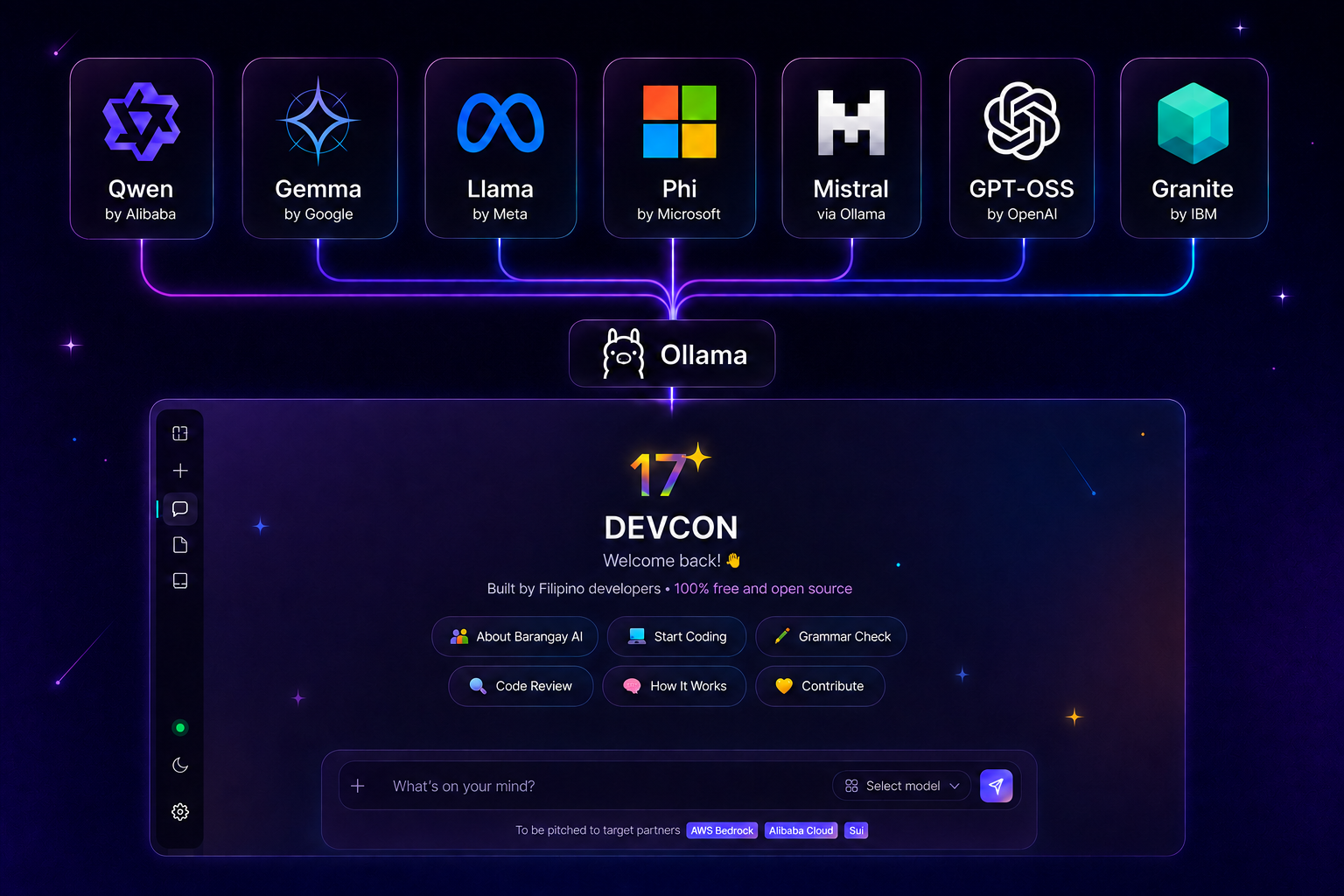
Built by Filipino developers · 100% local, no cloud
Recent
Model
To be pitched to target partnersAWS BedrockAlibaba CloudSui
AI can make mistakes. Verify outputs before acting on them.
Mabuhay!
DEVCON BARANGAY AI
Free, Open-source, Community-owned Build Your Barangay's AI
Today you're going to build your own AI.
Not use someone else's. Not pay for a subscription. Build one — name it, shape its personality, and deploy it live. In 4 hours.
The AI runs entirely on this computer. No cloud. No API fees. No data leaving this room. It's yours.
This app connects to any open-source model out there, served through Ollama or any OpenAI-compatible endpoint, all running free and offline on this computer.
Why this matters
Most Filipinos use AI tools built elsewhere. Today you join the group that builds them.
Everything here — the model, the code, the tools — is free and open source. No license. No per-token fees. Works on this school computer.
By the end, you'll have a live URL and a GitHub contribution — things you can show to anyone.
What you'll do today
Hour 1Learn the concepts. Fork the repo on GitHub.
Hour 2Run the AI on this machine. Talk to it from the terminal.
Hour 3Name it. Give it a personality. Make it yours.
Hour 4Publish it. Share the live URL. Open your first Pull Request.
Camp day guide — how today works
Ask questions
Raise your hand any time — no question is too basic.
Help each other
If your neighbor is stuck and you're not, help them. That's how open source works.
Break things
Edit the code. See what breaks. That's how you learn what it actually does.
No experience needed
If you can type and read, you can do this. The code is already here — you're just making it yours.
GitHub account
You'll need one — it's free. Your PR at the end is your first open source contribution on record.
Glossary — tap to expand the words you'll hear today
AI
A program that learns patterns from data and uses them to answer questions or generate text. Like autocomplete, but really, really good.
LLM
Large Language Model. The AI's brain — trained on billions of sentences to predict what word comes next. Like a student who has read every book in the library.
Qwen
The specific AI model you're using today — made by Alibaba, free and open source, small enough to run on this computer. Like a free, downloadable brain.
Ollama
Software that runs AI models on your own computer without needing the internet. Like VLC for video — but for AI models.
API
Application Programming Interface. A way for two programs to talk to each other. Your chat app sends a message to Ollama's API, Ollama asks Qwen, Qwen replies. Like a waiter — you don't go to the kitchen, you order through the waiter.
Terminal
A text window where you type commands directly to the computer. No clicking — just typing instructions. Like texting your computer instead of tapping buttons.
GitHub
A website where developers store and share code. Think of it as Google Drive for code — but with version history and collaboration tools. Your code lives here. Anyone can see, fork, and build on it.
Fork
Making your own copy of someone else's code on GitHub. You can change it however you want without affecting the original. Like photocopying a recipe so you can add your own twist.
Pull Request
A way to suggest your changes back to the original project. The project owners review it and decide whether to merge it in. Like submitting a revised chapter to an editor.
Vercel
A free hosting service. Connect your GitHub repo and it automatically gives your app a live public URL anyone can visit. Like publishing your website in 60 seconds.
Open Source
Code that anyone can read, use, and improve for free. No hidden parts, no fees. Like a recipe published in a community cookbook — anyone can cook it, improve it, and share it.
Streaming
Why the AI types word-by-word instead of all at once. The response is sent live as it's generated. Like watching someone type a reply in real time, not waiting for them to hit send.
System Prompt
A hidden instruction you give the AI before the conversation starts. It shapes the AI's personality, role, and behavior. Like a job description you give a new employee on their first day.
localhost / 127.0.0.1
A special address that means "this computer." When you visit 127.0.0.1:11434, you're talking to a server running on your own machine, not the internet. localhost is the word form of the same address, but type the numbers when connecting a model — on Windows the word can point at IPv6 ::1, which Ollama isn't listening on. Like calling your own phone — you're not calling someone else.
git push
A command that uploads your local code changes to GitHub. After this, your code is online and Vercel can pick it up. Like hitting "sync" to upload your work to the cloud.
Frontier AI
The most powerful, cutting-edge AI models in the world — like GPT-4 or Gemini Ultra. They require massive computers and cost millions to run. Like a Formula 1 car — incredible, but you can't park it in your garage.
Lightweight
A small AI model designed to run on regular hardware — like your laptop or school computer — without needing a powerful GPU. Qwen 2.5 3B is lightweight. Like a motorcycle instead of a truck — less power, but you can actually own and drive it.
Hallucination
When an AI confidently states something that is completely wrong or made up. It doesn't know it's lying — it's just predicting plausible-sounding words. Like a student who didn't study but still writes a very convincing wrong answer.
Parameters
The numbers inside an AI model that were learned during training. More parameters usually means smarter — Qwen 2.5 3B has ~3 billion of them. Like the billions of neural connections in a human brain.
Training
The process of teaching an AI by feeding it huge amounts of text and adjusting its parameters until it gets good at predicting language. Qwen was trained by Alibaba. Like studying for years before you can do a job — we skip this part and use the already-trained model.
Inference
When a trained AI model actually runs and answers questions. This is what happens when you send a message — the model is doing inference. Training is studying. Inference is taking the exam.
Token
The basic unit an AI reads and writes — roughly a word or part of a word. AI models think in tokens, not letters or sentences. Like how a song is made of notes, not just "music" as one thing.
Context Window
How much text an AI can "see" at once — its short-term memory for a conversation. Once the conversation is too long, early parts get forgotten. Like a whiteboard — once it's full, you have to erase something to write more.
Quantization
A technique that shrinks an AI model's file size by storing its numbers less precisely — trading a tiny bit of quality for much lower memory use. Like compressing a photo to JPEG — slightly lower quality, but 10x smaller file.
GPU
Graphics Processing Unit. A chip originally built for games that turns out to be perfect for running AI — it can do millions of math operations in parallel. Like using a 100-lane highway instead of a single road.
Prompt
The message or question you type to the AI. How you write it matters a lot — a well-written prompt gets a much better answer. Like asking a question in class — "explain gravity" vs "explain gravity using a basketball analogy for a Grade 7 student" gets very different answers.
RAG
Retrieval-Augmented Generation. A technique where you feed the AI extra documents before it answers, so it can give more accurate, specific responses. Like an open-book exam — the AI can look things up before answering.
Deployment
Publishing your app so other people can use it — not just on your machine. Today you deploy to Vercel so anyone with the link can use your AI. Like moving from cooking for yourself to opening a carinderia.
About DEVCON
DC
DEVCON Philippines
The Philippines' largest developer community — a non-profit volunteer org that has been running tech events, code camps, and developer education since 2007.
AI Sa Barangay is DEVCON's mission made real — proving that Filipino students anywhere, in any school lab, can build real AI products with zero budget.
Every camp is free. Every tool used is open source. Every student leaves with a live project and a GitHub contribution on their profile.
DEVCON believes the next generation of AI builders should come from the Philippines — not just use tools built elsewhere.
Windows: Press Ctrl+Shift+Esc → Performance tab. "Memory" is your RAM; click "GPU" and look for Dedicated GPU memory (that's VRAM). Or press Win+R, type dxdiag, and check the Display tab.
Mac: menu → About This Mac. Apple Silicon (M1–M4) shares memory — pick "No dedicated GPU" and your RAM size.
Linux:free -h for RAM; nvidia-smi or lspci | grep VGA for GPU.
Tell us your PC's specs and we'll sort every model by fit. Tap the i if you don't know them.
Step 3 of 3 · Set up your AI
Let's get it ready
Three quick things — name it and sign it, connect a model so it can reply, then make it yours. You can change any of these later.
1 Name it & sign it (required)
Your name is credited as the builder when you publish this AI.
2 Connect a model
This is what makes your AI actually reply — point it at a local Ollama model or a cloud API.
3 Make it yours (optional)
Personality, reply language, brand color and greeting — tune it all in Settings.
In a hurry? Fill in the two names above, then hit Enter chat — the model and the personality can wait.
Add Models (Endpoints)
Connect local models first, or add a cloud API.
LOCAL
Run a model on your own computer with Ollama — free, private, and works offline.
1
Install OllamaDownload for your OS from ollama.com/download and run the installer.
2
Download a modelIn a terminal, pull a small model to start (≈2 GB):ollama pull qwen2.5:3b
3
Start the server with the bundled scriptRun it from the project folder — it frees port 11434 first, then starts Ollama with browser access enabled. Double-clicking the file works too. Leave that terminal open while you chat../start-ollama.shRather type it yourself? Same thing in one line — OLLAMA_ORIGINS is what lets the browser reach it:pkill -f ollama; OLLAMA_ORIGINS=* ollama serve
4
Connect it herePaste this endpoint in the field above, then click Add:http://127.0.0.1:11434/v1Use the numbers, not localhost: on Windows localhost usually resolves to IPv6 ::1 first, while Ollama listens on IPv4 only — so localhost gets refused before it ever reaches the server.
Tip: bigger models (llama3.1:8b, qwen2.5:7b) are smarter but need more RAM. Start small and scale up.
API
Added Models (Endpoints)
Manage the endpoints you've added.
Ollama not detected
We can't reach Ollama on this computer yet.
One-click downloads pull the model straight through Ollama, so it needs to be installed and running first.
Already have it? Run the bundled script from the project folder — ./start-ollama.sh — it frees the port and starts Ollama with browser access in one go, then retry below. Prefer one line? pkill -f ollama; OLLAMA_ORIGINS=* ollama serve.
Downloading…
Personalize Your AI
Customize name, colors, personality & greeting
BA
Good to see you!
Barangay AI
Preview
Save multiple personas and switch between them. The selected persona's name & personality below are what the AI uses in chat.
Shown beside every reply, and when you publish.
The AI's name — appears in the header, welcome screen, and chat avatars.
Your name — credited as the builder of this AI. Required before you can publish.
The AI will reply in this language regardless of what you type. Beta languages may vary in quality on smaller models.
The greeting line shown above the AI name on the welcome screen. Leave blank to use a random greeting.
Pick a preset, jot rough notes and hit Expand, or write your own — the hidden instruction that shapes how the AI thinks, speaks, and responds.
Added to the personality prompt.
Drop files or click to browse
.txt .md .json .csv .log .pdf .docx · 2 MB each
Contents become background knowledge in the AI's prompt. Stays in your browser.
Topics your AI must refuse. One per line, or comma-separated.
You listgambling
Visitor asksWhat’s the best sabong betting site?
Your AIThat’s outside what I can help with.
Applies in chat and on your published AI. It shapes the prompt — a determined visitor can still talk around it.
Optional. Paste a key from console.groq.com (free, no card) and the Review tab uses Groq to write your flashcards — useful when no model is running on this machine. Leave it blank and Review borrows whichever model the app already has selected.Stored on this device only. It is never written into my-ai.json, so publishing cannot leak it — a deployed copy uses the MODEL_API_KEY environment variable on the server instead.
When on, the AI searches the web for your question and uses the top results as context for its answer. You can also flip this with the web search button beside Send.Required for web search. Get a free key at tavily.com — the free tier covers ~1,000 searches/month. Stored locally on this device only.
After each answer, the AI suggests two questions you could ask next. Off by default because it costs one extra short request per reply — that's free on your own machine, but if you publish this AI, every visitor's message will spend it against your hosting quota too.
1.0
Precise / CodeBalancedCreative
Lower = focused and deterministic (good for code). Higher = more varied and creative.
No limit
ShortNo limit
Caps how long each reply can be. Starts at no limit — slide left to cut replies short.
Your AI lives in this browser — which is why it's private, and why a plain git push would deploy the blank starter app instead of yours. Publishing writes everything you've customized into one file, my-ai.json, that ships with your code. Visitors get your AI exactly as you built it; only you can change what it is.
1
Drop the file into your project folder
Right beside index.html. That's it — no renaming, no editing.
2
Commit and pushgit add .
git commit -m "Publish my AI"
git push
3
Import the repo on Vercel
Add New → Project → pick your fork → Deploy.
4
Give it a model to think with
Your visitors can't reach the Ollama on your laptop, so the live copy needs a hosted one. Create a key on your own free account at console.groq.com (no card), then on Vercel: Settings → Environment Variables → add MODEL_API_KEY → Redeploy. The key is yours and so is the allowance it spends — every visitor's message draws on your free daily quota, which resets each day.
Your published copy answers using that hosted model — so it works for anyone, anywhere, but it isn't the private one, and every message it answers spends a little of your own free allowance. The offline AI on this computer stays the real one — unmetered, however much you use it. The live link just proves you built it.
Your current setup. Change any of it in Personalize, then Apply & Save.API keys are never written to this file — it goes to GitHub, where anyone could read it. Your own hosted-model key belongs in a Vercel environment variable instead (step 4 above), where only the server can read it.
Opens your own copy locked down, exactly as the world gets it. Needs my-ai.json in the folder already.Publishes what you last saved. Changed something just now? Hit Apply & Save first, then come back.
Review Study Buddy
Flashcards from your own material, tagged across Bloom’s six levels
What to build cards about. With Sources on, this also decides which parts of them get used.
Grounded on your active Sources.
Levels 1–3 are recall and comprehension; 4–6 are the reasoning an exam question actually tests. Leave all six on for a balanced deck, or narrow it to drill one weak level.
Written five at a time, so a batch that comes back malformed costs five cards instead of the whole deck.